
API, SSH Task, and Database
Send a saved API request, run a saved SSH Task on an explicit connection, or execute SQL on a saved Database connection.
Flow
Unfour Flow is a user-defined local runbook that combines saved API requests, SSH Tasks, and Database queries in the same workspace. Reuse the steps you already trust for troubleshooting, operational checks, or deployment tasks.
Flow editing and execution are included in the free, open-source core. Pro adds optional definition sync so you can continue using saved Flows on another device.
Read the docs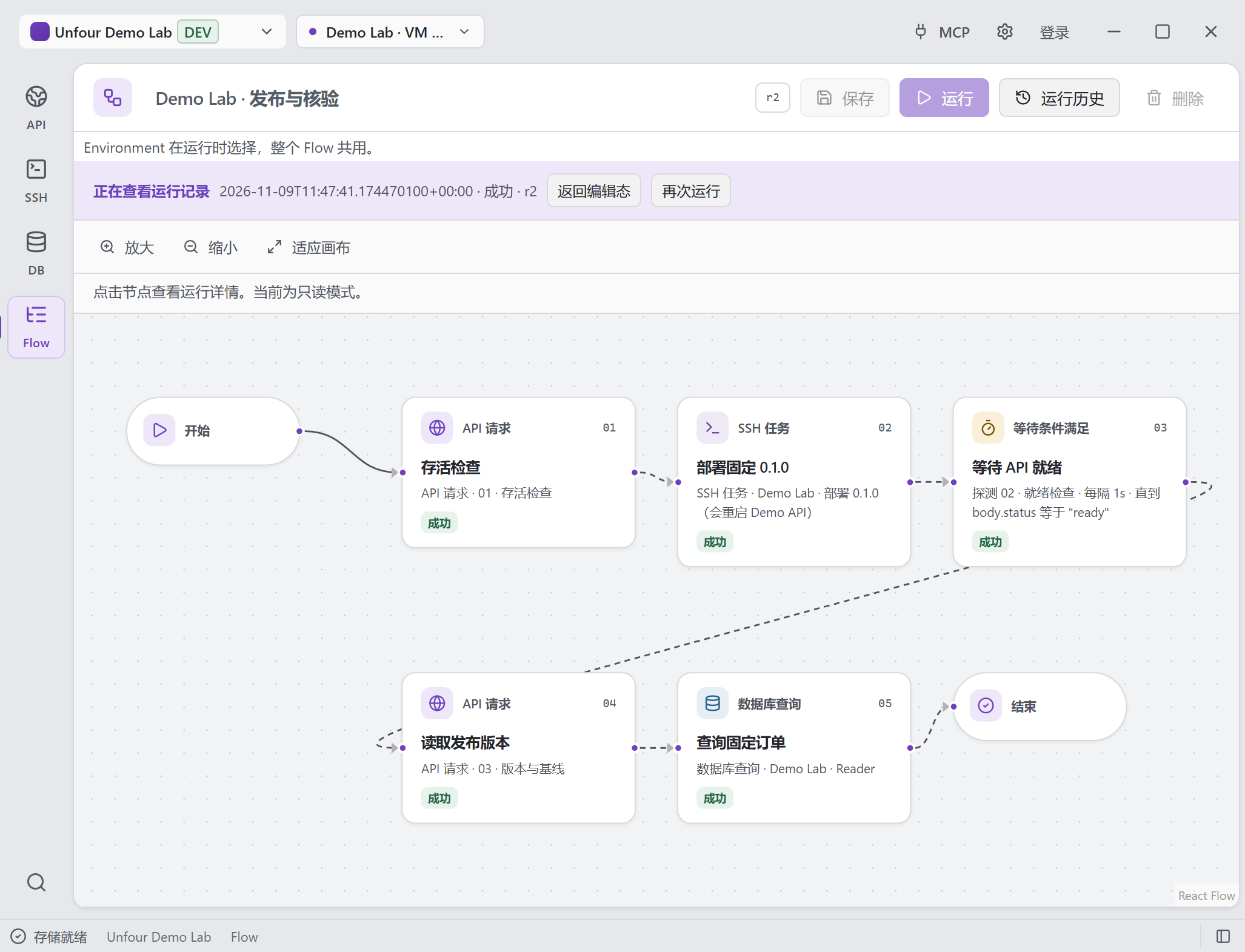
One completed Demo Lab run: check the API, run an SSH deployment task, wait for readiness, read the version, and query the database. Each step shown succeeded.
Open full-size image to inspect detailsFlow is the fourth core module alongside API, SSH, and Database. It reuses their saved resources rather than requiring a separate set of connections.
Send a saved API request, run a saved SSH Task on an explicit connection, or execute SQL on a saved Database connection.
Compare inputs or earlier step results and choose the next forward step. You define the decision rule.
Check an API or read-only Database result at a fixed interval until your success or failure condition matches, or the timeout is reached.
Declare typed run inputs and pass earlier results to later steps, so the same runbook can use different task inputs.
Edit the local runbook in Canvas, then inspect step outcomes, polling attempts, and failed or cancelled runs in history.
Codex and Cursor can manage, run, and cancel local Flows and read their history through workspace-scoped MCP tools.
Example local runbook
For example, define a read-only test-environment runbook that sends a health request, runs an SSH Task to inspect service logs, queries relevant database state, and evaluates the results. A developer still interprets the evidence and decides the fix.
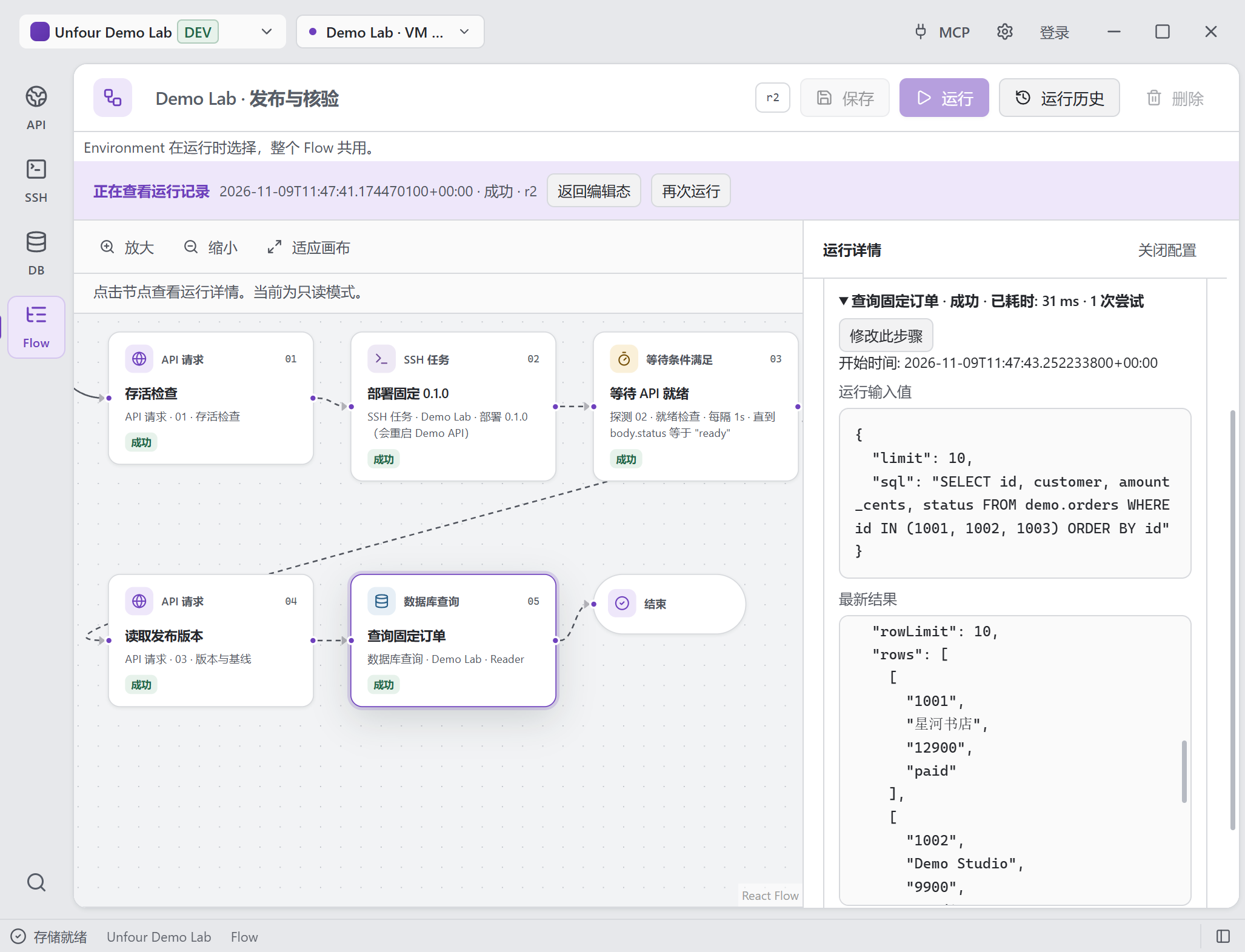
Select a completed step to inspect its actual inputs and result. The database step is selected in this saved run; the canvas remains in read-only history mode.
Open full-size image to inspect detailsFlow V1 boundary
Flow executes locally and is not a general workflow or agent platform. It runs the steps you define; it does not discover a root cause or choose a remediation.
Pro Cloud Sync includes Flow definitions: steps, input declarations, and resource references. Run history, actual execution inputs/outputs, credentials, and device-local configuration stay local.
Flow belongs to the free, open-source core. Pro still adds only Cloud Sync for supported data.
V1 has no scheduler, webhook triggers, parallel steps, sub-flows, or LLM/Agent nodes.
API steps do not support saved request scripts or multipart bodies. Wait Until probes use GET/HEAD API requests or run a read-only query on a database connection configured as read-only.
MCP Flow execution requires confirmation even in full access and is blocked by read-only policy. Cancelling a run does not undo completed effects.
Availability, scope, sync, and MCP access.
Unfour Flow is a local developer runbook for combining saved API requests, SSH Tasks, and Database queries with Condition branches, Wait Until checks, and run history.
Yes, with Pro: definitions sync so you can use the saved Flow on another device. Steps, input declarations, and resource references sync; run history, actual inputs/outputs, credentials, and device-local configuration do not. Editing and execution remain free.
The Flow MCP tools use the same saved definitions, workspace resources, and run history as the desktop UI. Execution requires confirmation and a policy that permits Flow execution; read-only policy blocks it.
No. Flow executes user-defined local steps. V1 has no scheduler, webhook triggers, or LLM/Agent nodes, and Unfour does not automatically identify or fix a root cause.
Save the requests that reproduce a symptom or check a service.
Explore API ClientDefine reusable SSH Tasks for server checks or deployment steps.
Explore SSH TerminalKeep SQL checks connected to the intended database and schema.
Explore Database ExplorerDownload Unfour and follow the Flow docs to save and run your own local checks.